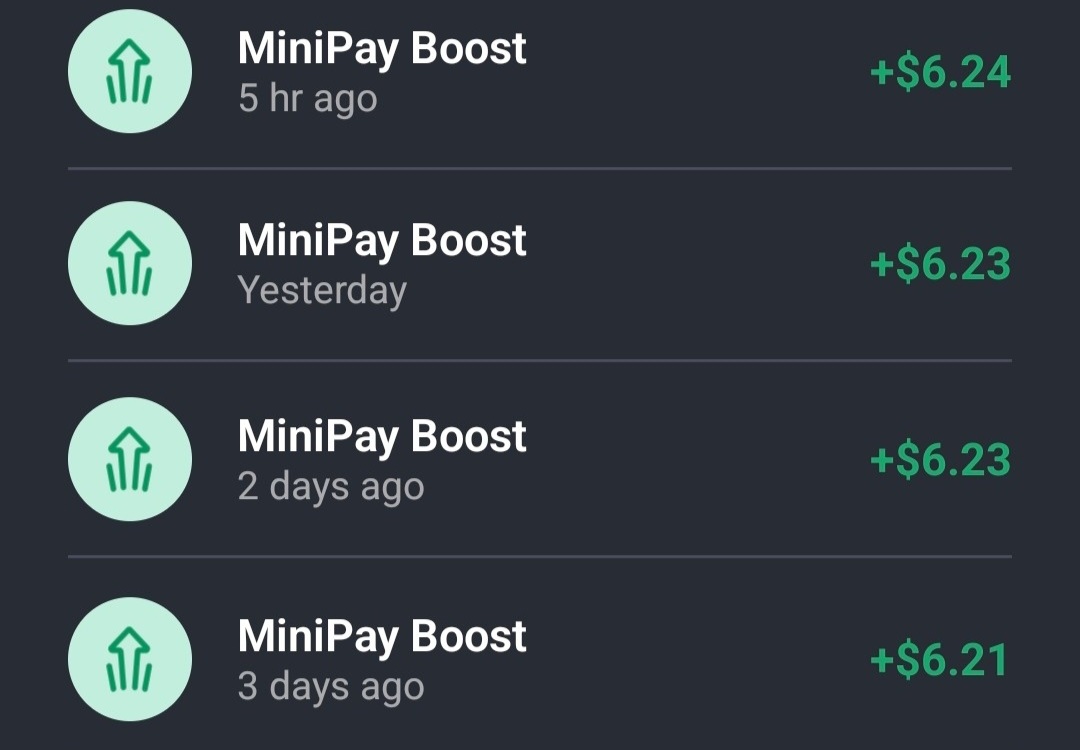
MiniPay Boost Reward: Earn upto $6 USDT Daily by Holding Stablecoin

If you have been keeping your stablecoins (USDT, USDC, USDm) or any cryptocurrency in your exchange or wallet without earning any daily profits from them, then you are on the right page.
MiniPay Boost makes your crypto work for you 24/7 by holding a reasonable amount of stablecoin and rewarding you daily. The best part? You retain full control over your deposit while earning every day. Without further ado, let’s dive into the details.
What’s MiniPay
MiniPay is a fast, low-fee, mobile-first stablecoin wallet built on the Celo blockchain by Opera. It allows users to send, receive, and store digital dollars (stablecoins like cUSD, USDT, or USDC) instantly to phone contacts for sub-cent fees. Stablecoins are digital versions of the U.S. dollar that hold their value. If you have $10 in USDT today, you still have $10 tomorrow.
With MiniPay, you’re always in control. The wallet is self-custodial, which means your money is fully under your control at all times. Your balance remains in your wallet, protected by your phone’s biometrics, PIN, or passcode. And for peace of mind, your wallet keys are securely backed up to your Google or iCloud account for easy recovery.
How MiniPay Boost Works
Boost is a reward program that runs automatically in your MiniPay wallet. If you hold at least $1 USDT, you’re eligible. There is no sign-up required, Boost analyzes your balance and activity to calculate dynamic rewards of up to 2% weekly. Since it’s a reward (not an investment), your crypto never leaves your custody. You can spend or withdraw anytime; Boost simply adds value on top of your everyday wallet activity.
Boost rewards you in USDT, the world’s most liquid stablecoin, ensuring your earnings hold their value and are ready to use instantly. Unlike staking or yield farming, Boost requires no locking, no delegating, and no smart contracts. Your USDT remains fully liquid and accessible—there’s no validator risk, liquidity risk, or protocol exposure. Your balance simply grows as you use your wallet.
How to Earn Daily USDT Rewards by Holding Stablecoin on MiniPay
The very first step to enjoy what MiniPay has to offer is to sign up on the MiniPay app or access MiniPay via the Opera Mini browser. Follow the step-by-step guide below to learn how to register, deposit, earn Boost & withdraw.
How to Sign-up on MiniPay
- Download MiniPay App from Playstore or Apple Store.
- Open the app and SignUp with your Google or iCloud account.
- Next, you’ll need to link a phone number to receive internal stablecoin transfers from other users.
- Put in your WhatsApp number and verify it with the OTP sent to your WhatsApp account.
Once you are done with the sign-up process, you can proceed to the next step, which is to deposit.
How to Deposit on MiniPay
There are different methods of deposit on MiniPay, and these include:
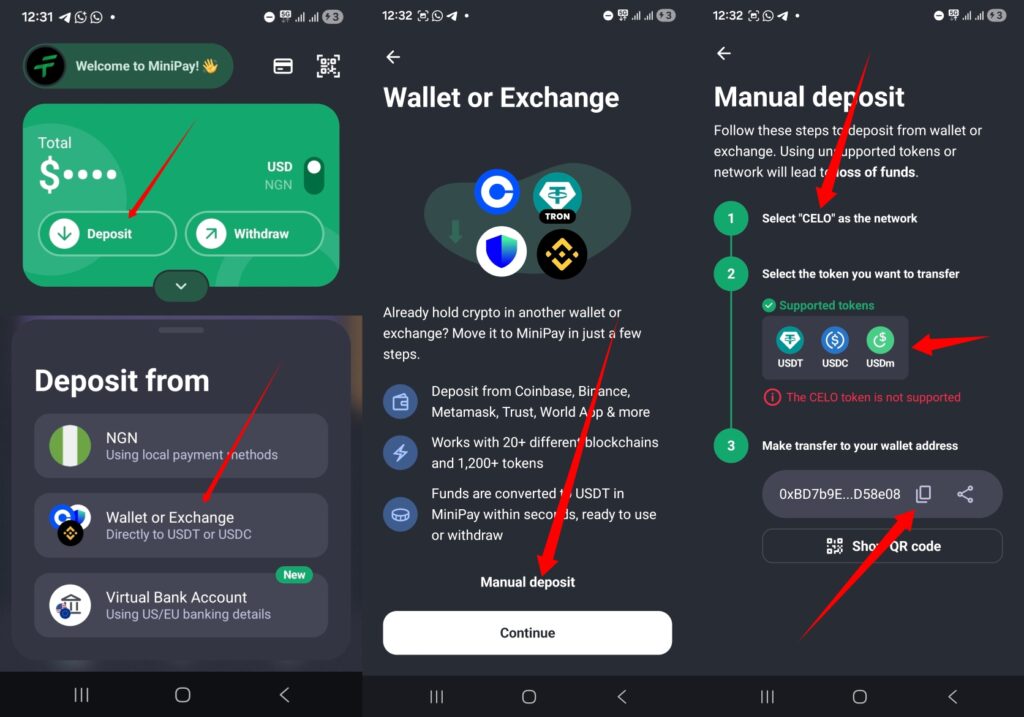
1. Deposit via Wallet or Exchange: You can transfer cryptocurrency (USDm, USDT, or USDC) on the Celo blockchain directly from an external wallet or exchange into your MiniPay wallet. To do that, make sure you swap your assets from any cryptocurrency to USDT (Preferably).
NOTE: Only USDT balances earn MiniPay Boost rewards. If you deposit USDC or another stablecoin, you can swap it for USDT directly in MiniPay to start earning.
Open your MiniPay wallet, then go to Deposit > Select Wallet or Exchange > Tap on Manual Deposit. You can then copy your MiniPay wallet deposit address. Please note that this address supports USDT, USDC, and USDm on the Celo blockchain. Be sure to select Celo as the network before sending funds to your MiniPay wallet.
2. Bank Deposit: The other method is to Deposit using your Local Currency. You can make a transfer from your local bank account to Minipay. To do that, click on Deposit > NGN > Select Bank Transfer. There are various service providers to complete the deposit which includes Partna, Quidax, Fonbnk & Cashramp.
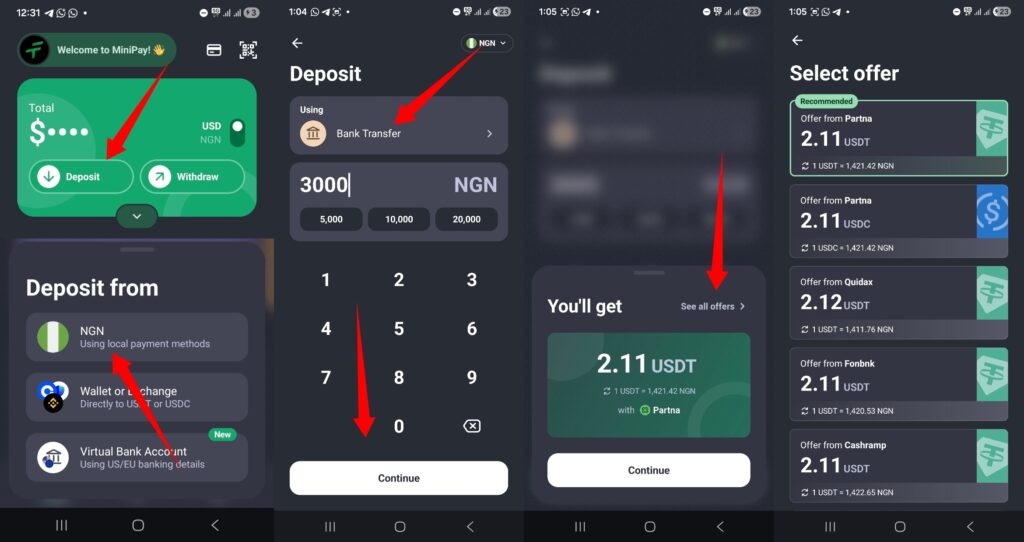
To choose your preferred service provider, enter the amount you wish to deposit, click Continue, and then tap See All Offers. Partna requires BVN verification before you can make a deposit, while Fonbnk and Cashramp do not require verification for small deposits. Once you complete the deposit with any of the service provider (Make sure you select service provider with USDT Option), the equivalent amount of your deposit in USDT will be added to your MiniPay wallet.
3. Internal Transfer: You can also receive deposit from vendors, friends or family via internal transfer. All you have to do is provide them with the number linked to your MiniPay. They will fund your wallet by using the Phone Number option under Pay Tab.
How to complete MiniPay Boost Task and earn upto $6.3 Daily
As mentioned earlier, MiniPay Boost allows you to earn daily crypto rewards in USDT upto 2% Weekly. You only need a minimum balance of $1 to start earning. Opera recently upgraded MiniPay Boost, so users can now earn up to 6 times more than before.
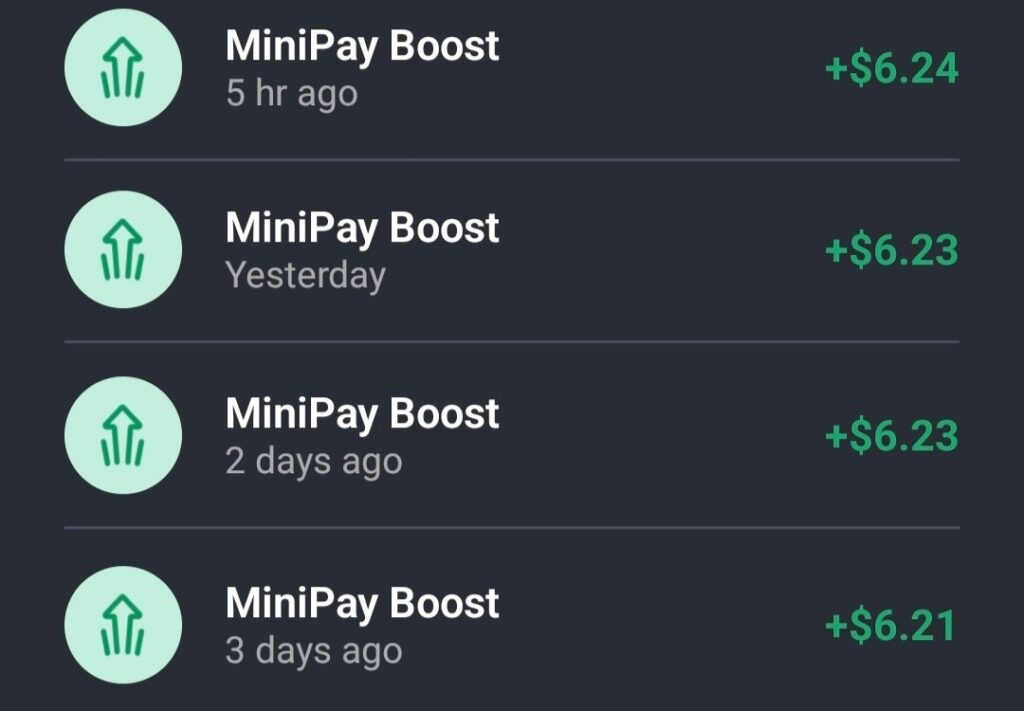
Before the upgrade, MiniPay users earned a maximum of $10 weekly (about $1.43 daily). Those with $1,000+ balances earned roughly $1.40+ daily, while users with smaller balances earned less. Now, thanks to the Boost upgrade, you can earn up to 6 times that amount daily.
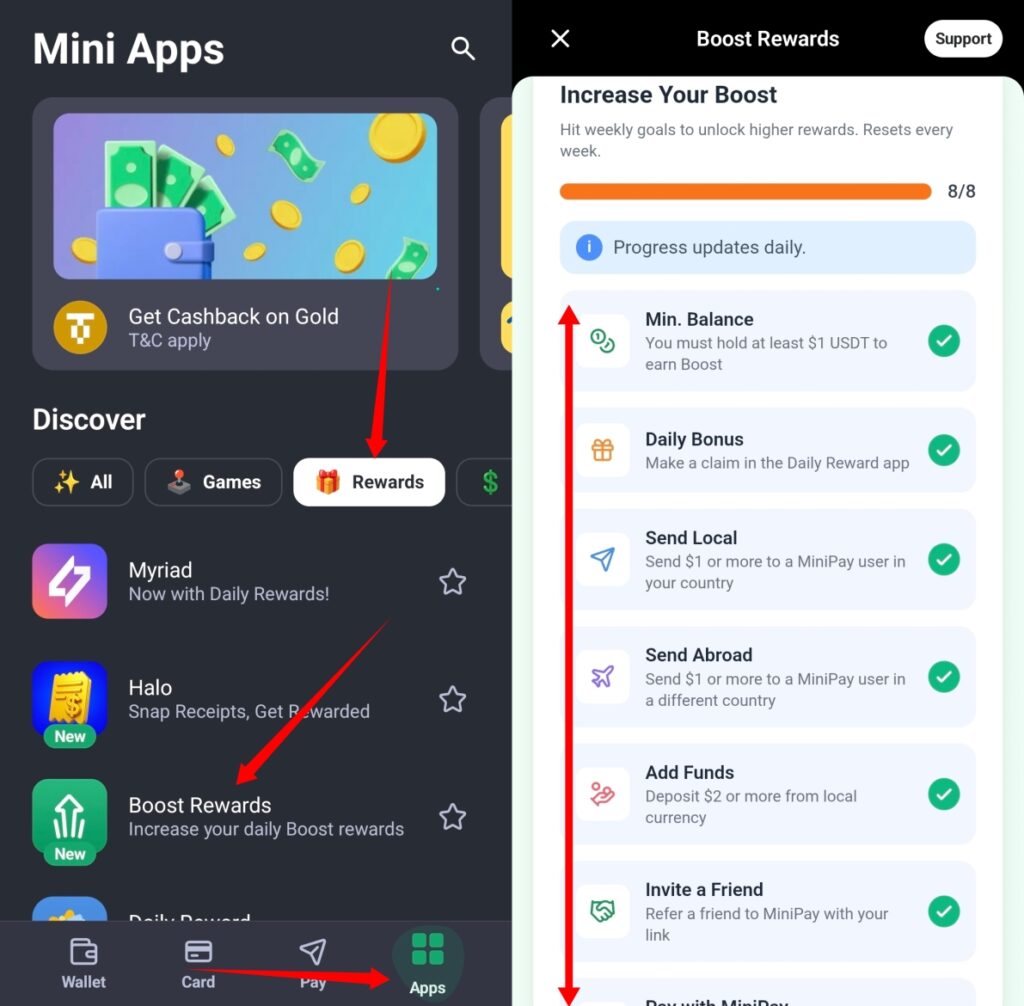
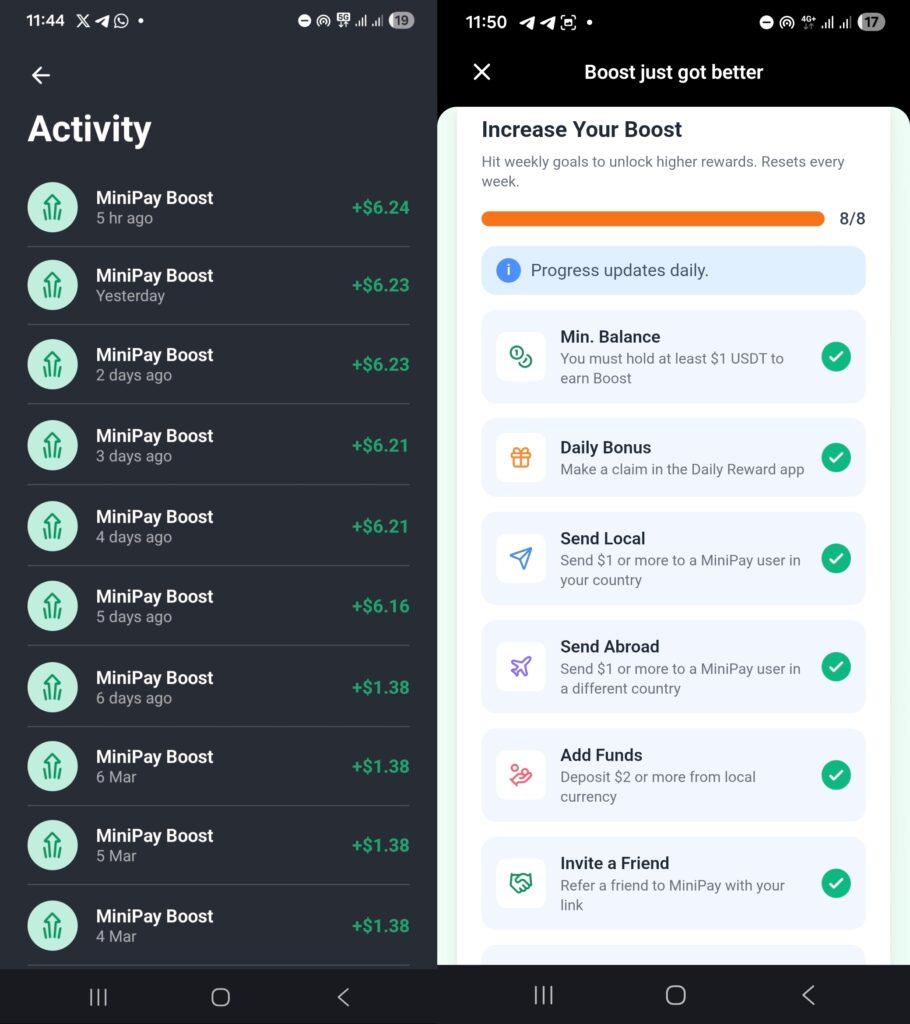
To benefit from this upgrade, you need to complete the Boost Tasks each week. Navigate to App > Rewards > Boost Rewards to access the Boost page. Simply complete all 8 tasks to maximize your daily reward. Since tasks reset every week, you’ll need to complete them weekly to continue earning Boost. Check out the boost task below and how to complete it.
1. Min. Balance: The first task is to hold a minimum deposit of $1 USDT to earn boost. You can scroll up to see how to Deposit using Cryptocurrency, Local Currency or Internal Transfer.
2. Daily Bonus: Claim the daily bonus under the daily reward app at least once every week. To do that, Go to App > Reward > Daily Reward and Claim.
3. Send Local: Send $1 or more to a MiniPay user in your country. Tap the Pay icon at the bottom of the screen, select Phone Number, paste the recipient’s number, and complete the transfer.
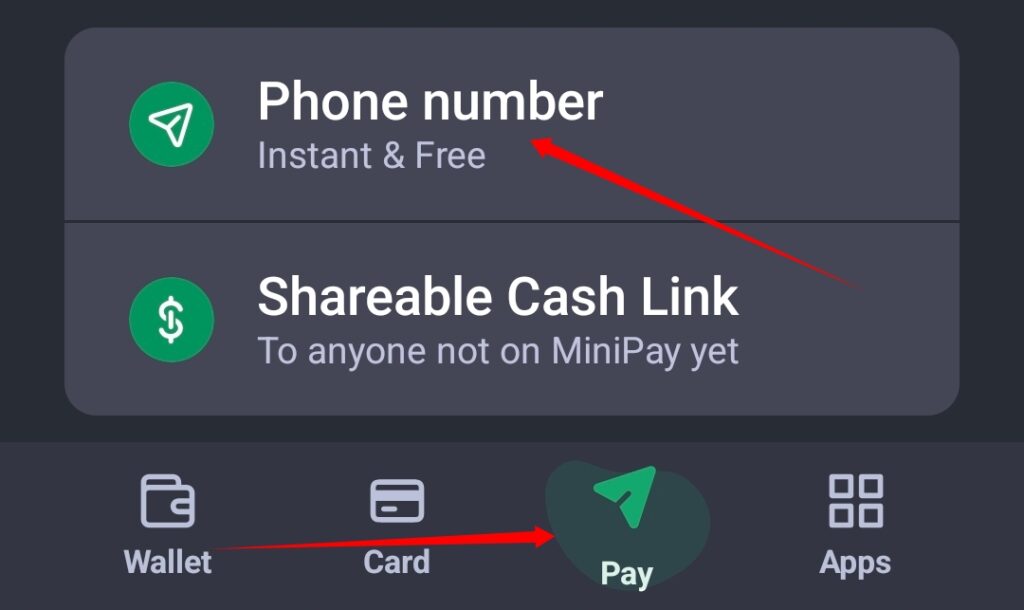
4. Send Abroad: Send $1 or more to a MiniPay user in a different country. Tap the Pay icon at the bottom of the screen, select Phone Number, paste the recipient’s number from another country, and complete the transfer.
5. Add Funds: Deposit $2 or more from local currency. Click on Deposit > Bank Transfer > Enter amount N2,900+ and complete Deposit.
6. Invite a Friend: Refer at least one user to MiniPay with your link. Go to Profile > Invite Friends to copy your link.
7. Pay with MiniPay: Use the Bank Transfer feature under Pay Tab to make payment or send money to your personal account. Click on Pay > Bank Transfer and complete payment.
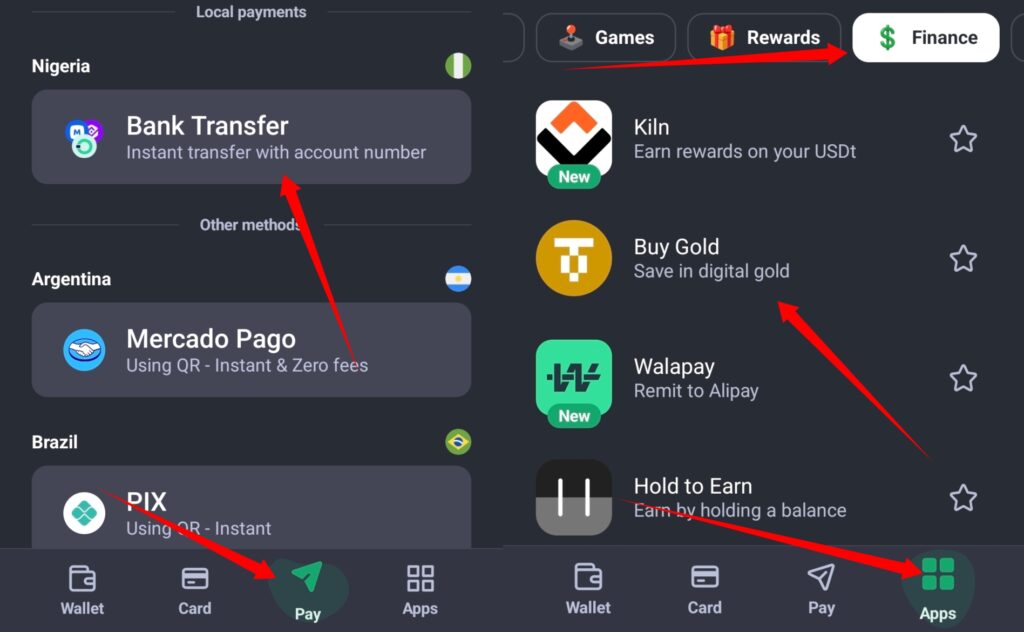
8. Spend: Buy Airtime, Data, Gold, or use other Finance Apps. To easily complete this task, you can proceed to Buy & Sell Gold. Go to App > Finance > Buy Gold then purchase $1 worth of Gold with your balance and sell back.
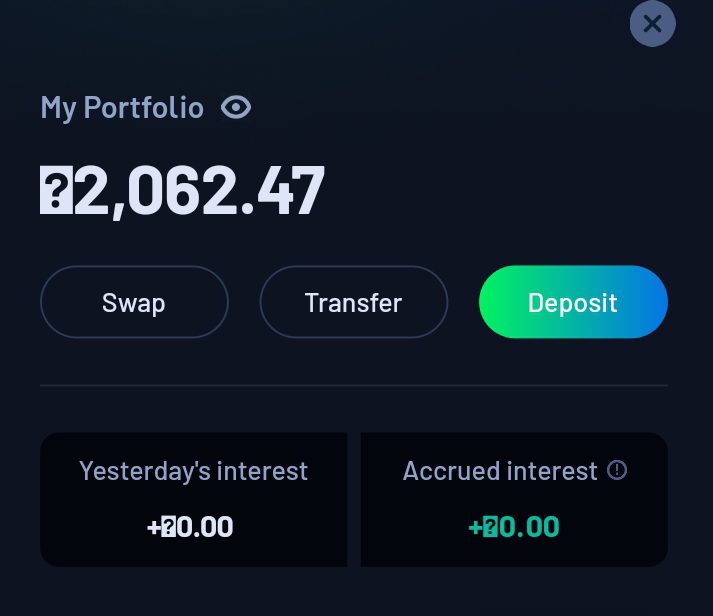
NOTE: With just $100 USDT balance, you can earn upto $1.3 daily if you complete the boost task 8/8. It’s not compulsory you complete everything to earn a boost, the higher your balance, the higher you earn.
Your Boost bonus will drop daily within 6-10am. Also, once you deposit, you can complete the Boost task immediately without waiting for the task to show.
How to Withdraw from MiniPay Wallet
You can withdraw from your MiniPay wallet any time, any day to Exchange or Local Bank.
1. Stablecoin Withdrawal: You can withdraw your USDT or USDC balance to exchanges such as Binance, Bybit, or Gate.io. Go to Withdraw > Exchange, select your preferred exchange, paste the deposit address (ensuring Celo is selected as the network), and complete the withdrawal.
2. Local Currency Withdrawal: You can withdraw directly to your Local bank account. Just click on Withdraw > NGN > Bank Transfer > Enter amount and proceed to withdraw.
How to Add Extra Security to Your MiniPay Wallet
It’s important to note that your MiniPay wallet is backed up to your Google or iCloud account, which means anyone with access to that account can access your wallet. The only way to secure it is to add extra security to your Google or iCloud Accounts.
For Android Users, Open Gmail App, click on your Profile Icon > Manage your Google Account > Security and Sign in then turn on 2-Step Verification and Recovery Phone Number. iOS Users should go to their Settings App > Click on Your Name > Sign-in & Security and turn on 2-Step Verification.
In case you lose permanent access to your Google or iCloud account, you can copy your MiniPay recovery phrase and keep it somewhere safe. Go to your MiniPay Profile > About > Secrete recovery phrase and save it somewhere safe.
Your secret recovery phrase allows you to access your MiniPay wallet funds anytime, even without the MiniPay app. Simply import the phrase into any compatible wallet, such as OKX Wallet, Valora App, etc.
NOTE: Never screenshot your secret recovery phrase or store it in your gallery. This phrase is something you must guard carefully and keep in a place only you can access. If you’re unsure where to store it securely, it’s best not to copy it at all—just focus on keeping your Google account safe.
Conclusion
MiniPay makes earning daily USDT rewards simple and accessible. By holding just $1 in stablecoins and completing weekly Boost tasks, you can earn up to 6 times more than before—all while keeping full control of your funds. From sign-up to deposits, withdrawals, and security, every step is designed to be instant, low-cost, and borderless. Secure your recovery phrase, stay active, and let your crypto work for you 24/7.
Want to stay updated? Tap the below buttons to join our members now.


Do you have any issues with this post? Use the comment box below to report any issues related to this post, including broken links, and you will be replied as soon as possible. You can also contact us on telegram.